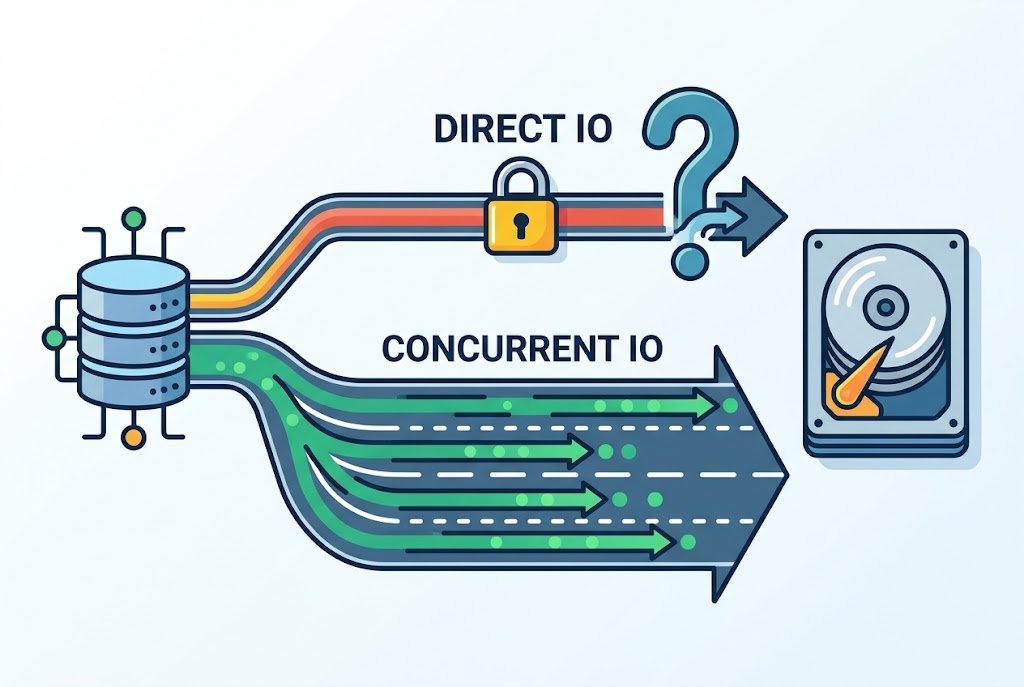
If your database handles its own locking and runs on a file system that supports it, concurrent IO is usually the better choice. It gives you what direct IO offers, mainly no double caching, and it also removes the file-level write lock that can hold back a busy database.
There’s a catch. Concurrent IO is only available on certain file systems, mainly IBM’s JFS2 on AIX and Veritas VxFS. On a typical Linux server running ext4 or XFS, direct IO is the option you’ll actually use, so your platform often makes this decision for you.
This guide covers what separates the two, how the choice plays out in Oracle, Db2, and MySQL, and the mistakes that cause the most trouble after a switch.
Concurrent IO vs Direct IO at a Glance
| Factor | Direct IO | Concurrent IO |
|---|---|---|
| Skips the file system cache | Yes | Yes |
| File-level write serialization | Yes on AIX, varies on Linux | Removed |
| What prevents overlapping writes | The file system | The application |
| Availability | Widely supported on Unix, Linux, and Windows (as non-buffered IO) | Mainly AIX JFS2 and Veritas VxFS |
| Non-matching program opens the file on AIX | File drops back to cached mode | The open fails |
| Best fit | Databases with their own cache on mainstream Linux | Write-heavy databases on JFS2 or VxFS |
| Biggest risk | Slower reads if the database cache is too small | Corruption if an unsupported app uses it |
Why Databases Skip the File System Cache
Your operating system normally keeps recently used file data in memory. That helps most programs, but a database already runs its own cache, usually called a buffer pool or buffer cache.
Without any tuning, the same data page can end up in memory twice: once in the database and once in the operating system. Say you’ve got a server with 64 GB of RAM. Some of that memory is holding duplicate pages, and the CPU is spending time copying data between the two caches.
Both options solve this problem the same way, by letting the database move data between its own memory and storage without stopping at the file system cache. Where they part ways is locking.
How Direct IO Works
Direct IO tells the operating system to skip its cache for a file. The database becomes responsible for caching, which is fine, because it knows far more about its own data than the operating system does.
On Linux, this is usually done with the O_DIRECT flag. One detail trips people up here: O_DIRECT isn’t a durability guarantee. The Linux manual notes that O_SYNC is needed as well if you want guaranteed synchronous IO, and databases handle that through their own flushing.
The bigger difference is locking. On AIX, direct IO still uses mandatory per-file write locking so overlapping writes can’t corrupt a file.
That protection is sensible for general programs. For a database, it can become a traffic jam. Picture a shared document where only one person can type at a time, even when everyone’s working on a different page.
Does Linux Direct IO Have the Same Bottleneck?
Not always, and this is where a lot of comparisons get it wrong. Most of what’s written about the write lock comes from AIX, and it doesn’t transfer neatly to Linux.
Modern ext4 and XFS can often run direct overwrites of existing blocks in parallel under a shared lock. Writes that extend a file or allocate new blocks are more likely to take an exclusive lock. The details vary by kernel version and file system, so treat this as a general pattern, not a promise.
That’s a big part of why Linux databases do fine without a separate concurrent IO mode. If you pre-allocate data files, a lot of your writes are overwrites anyway.
What Concurrent IO Changes
Concurrent IO keeps the cache bypass and drops that file-level serialization. Multiple threads can read from and write to the same file at the same time.
This is safe for databases because they already coordinate access themselves, usually at the page or row level. The file system’s lock is doing a job the database has already done, so removing it clears a bottleneck rather than a safety net.
IBM added this feature to JFS2 in 2003 and has said that database performance with it is often comparable to raw logical volumes. That’s a big deal for admins, since regular files are far easier to manage and back up than raw devices.
The trade-off is responsibility. With concurrent IO, nothing at the file system level is stopping two overlapping writes. If the application doesn’t coordinate them, the result can be data corruption.
Which One Is Better for Your Database?
The honest answer depends on your database and platform, so here’s how it breaks down for the most common setups.
Oracle on AIX
Concurrent IO is generally the right call for Oracle data files on JFS2. Setting filesystemio_options=SETALL lets Oracle open files with both direct and concurrent IO where appropriate.
Storage vendor NetApp recommends this setting over the cio mount option because it works per file rather than forcing the behavior across a whole file system. IBM’s older POWER7 tuning guidance also separates file types, advising against concurrent IO for archive logs and suggesting a 512-byte block size for the file systems holding redo logs and control files. Check the current guidance for your AIX and Oracle versions before you apply it.
IBM Db2
Db2 mostly takes this choice out of your hands. When you set NO FILE SYSTEM CACHING on a table space, Db2 picks the IO mode and uses CIO wherever the platform supports it.
In practice, that means CIO on JFS2 and VxFS, and direct IO on Linux ext3, ext4, and XFS. There’s no separate switch to choose between them.
MySQL with InnoDB
MySQL users aren’t really choosing between these two. The usual setting is innodb_flush_method=O_DIRECT, which applies direct IO to InnoDB data files. MySQL’s manual also suggests sizing the InnoDB buffer pool at about 50 to 75 percent of system memory.
Don’t treat O_DIRECT as automatically faster, though. NetApp reported that the default fsync method performed much better than O_DIRECT in its own lab tests on NFS and SAN storage with ONTAP. Your storage matters, so test it. Your version’s default may also differ.
Applications That Weren’t Built for It
If software doesn’t manage its own write coordination, stay away from concurrent IO. HCL’s documentation is blunt about Domino: neither concurrent IO nor direct IO is supported, and enabling CIO on Domino file systems can corrupt data or crash the server.
Before you enable either option under any product, look for a clear statement of support from the vendor.
When These Options Can Make Things Slower
Skipping the file system cache isn’t a free upgrade. A few situations can leave you worse off:
- A buffer pool that’s too small. Once the operating system stops caching, the database cache has to do that work alone. IBM’s Db2 documentation points to a small buffer pool as a possible cause of slowdowns and suggests growing it in 10 to 20 percent steps if self-tuning memory isn’t on.
- Sequential reads outside the database. Bypassing the cache also means losing file system read-ahead. File copies, tape backups, and some large scans can slow down noticeably.
- Software that depends on the OS cache. Without it, reads and writes become synchronous disk operations, and IBM warns against direct IO for these applications.
- Network file systems. On Linux,
O_DIRECTover NFS only bypasses the cache on the client. The server may still cache data, and some servers perform poorly with small synchronous IO.
Common Mistakes to Avoid
Mounting Everything With CIO
The cio mount option applies to every file on that file system, including ones that don’t belong to your database. Keep database files on their own file systems. MySQL’s manual gives similar advice for direct IO mounts, warning against putting executables or libraries on them.
Forgetting About Your Copy Scripts
On AIX, the O_CIO flag is exclusive. If a database has a file open in CIO mode, a plain cp can fail with an unhelpful error about an invalid parameter. This often surfaces when an old backup script stops working after a settings change.
Use your database’s own backup tools, or check with your backup vendor that the product supports CIO files.
Missing a Silent Direct IO Slowdown
Direct IO fails more quietly. On AIX, if another process opens the same file without O_DIRECT, the file falls back to normal cached mode until that process closes it. Nothing breaks, but you may lose the performance you tuned for, so a stray monitoring or copy job is worth checking if results suddenly drop.
Changing IO Without Changing Memory
Switching on either option frees memory on the operating system side, but the database won’t always claim it. Review your buffer pool settings as part of the same change.
How to Check What You’re Using Now
Before you change anything, find out where you stand. You may already be running one of these modes without knowing it, especially on Db2, which turns off file system caching by default on many platforms.
| Platform | What to run | What to look for |
|---|---|---|
| AIX or VxFS | mount | cio in the options column for your data file system |
| Oracle | SHOW PARAMETER filesystemio_options | setall, directIO, asynch, or none |
| Db2 | Query MON_GET_TABLESPACE | The fs_caching monitor element for each table space |
| MySQL | SHOW GLOBAL VARIABLES LIKE 'innodb_flush_method'; | O_DIRECT, fsync, or another method |
One thing to remember on AIX and Oracle: a clean mount output doesn’t rule out concurrent IO. With SETALL, Oracle can request it per file, so the mount options alone won’t tell you the whole story. Always check the database setting too.
How to Test the Change Safely
A small, boring rollout beats a dramatic one. Here’s a sensible order:
- Record a baseline. Capture read and write latency, CPU use, and buffer pool hit ratio during normal peak load.
- Confirm support. Check your database, operating system, and file system versions against vendor documentation.
- Change one thing in staging. Use a realistic workload, not just a synthetic benchmark.
- Adjust the buffer pool. Compare results at more than one memory size.
- Run your maintenance jobs. Test backups, restores, and any scripts that touch database files.
- Roll out with an exit plan. Move to production during a quiet window and write down exactly how you’d reverse it.
IBM’s own advice for Db2 points the same way: tuning should be tested in a controlled environment before it reaches production.
The Bottom Line
For a database that coordinates its own writes on JFS2 or VxFS, concurrent IO is usually the stronger option. For MySQL and other databases on standard Linux file systems, direct IO is the realistic choice, and the better question is whether it beats your current setup on your storage.
Your next step is simple: find out which file system your database files live on, then check what your database vendor recommends for that exact combination. Measure before and after, and let your own numbers make the final call.
Frequently Asked Questions
Is concurrent IO the same as direct IO?
No. Concurrent IO includes the cache bypass of direct IO, but it also removes the file system’s write serialization. Direct IO keeps that lock on AIX, while Linux behavior depends on the file system and kernel.
Is concurrent IO available on Linux?
Not on common file systems like ext4 or XFS. It’s available on Linux through Veritas VxFS, which Db2 supports for CIO. Most Linux databases use direct IO instead.
Is concurrent IO safe for databases?
Yes, when the database supports it and coordinates its own writes. It’s risky for software that expects the file system to prevent overlapping writes, so check vendor support first.
Do I need to choose between them in Db2?
No. Once you enable NO FILE SYSTEM CACHING, Db2 selects CIO or direct IO based on your platform. There’s no setting to pick one yourself.
Is concurrent IO the same as asynchronous IO?
No. Concurrent IO controls file locking and caching, while asynchronous IO lets a program keep working while a read or write finishes. Databases can use both together.