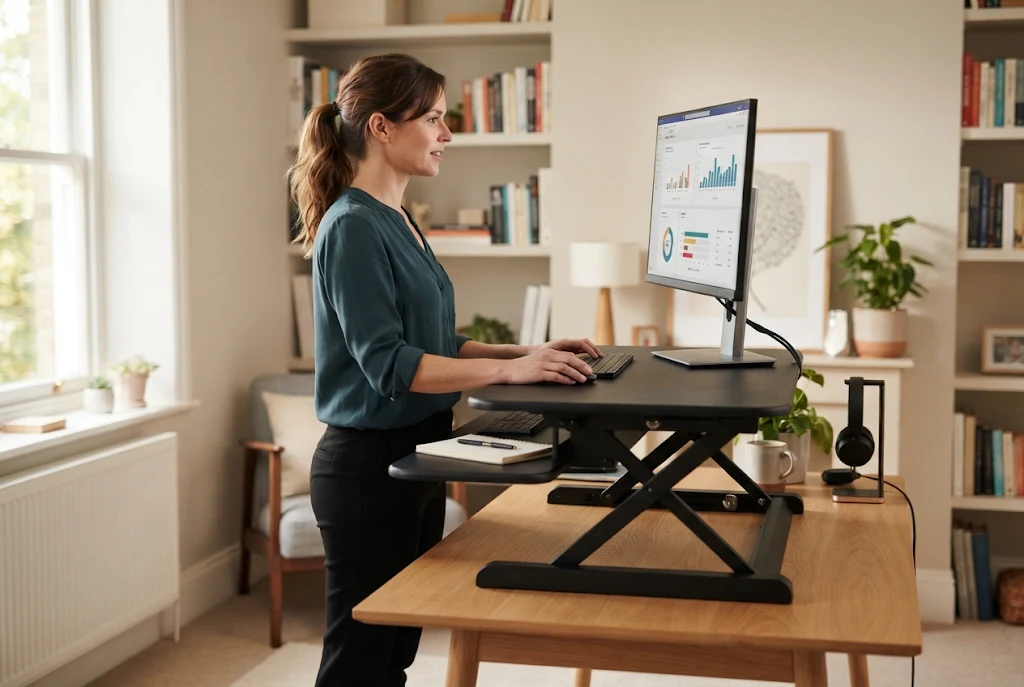
If you’ve spent an afternoon shifting in your chair, rolling your shoulders, and still ending the day with a stiff neck, a riser desk is one of the simplest fixes worth knowing about. So what is a riser desk? It’s a platform that sits on top of the desk you already own and lifts your monitor, keyboard, and mouse to standing height, letting you switch between sitting and standing without buying new furniture. The main payoff for most people isn’t dramatic weight loss or a cure for back pain. It’s steadier posture and less daily discomfort, because you stop holding one fixed position for hours at a time.
This guide walks through exactly how that works, what the evidence supports, and how to set one up so you actually feel the difference.
What Is a Riser Desk, Exactly?
A riser desk goes by a few names. You’ll see it called a desk riser, a desktop riser, or a standing desk converter, and in practice those terms all point to the same thing: an add-on platform that raises part of your work surface so you can stand while you type.
It’s different from a full standing desk. A standing desk replaces your entire desk with a height-adjustable frame. A riser sits on top of what you’ve got. Most models have two tiers, one for the monitor and one for the keyboard and mouse, and they move up and down with a spring, a gas strut, or a hand crank. You raise the platform when you want to stand, lower it when you want to sit, and keep working either way.
That “keep your existing desk” part matters more than it sounds. It’s the reason risers are cheaper, need little or no assembly, and fit into a setup you don’t want to tear apart.
How a Riser Desk Supports Better Posture
Good posture at a desk isn’t about sitting ramrod straight. It’s about keeping your joints in neutral, relaxed positions and not locking into any single one for too long. A riser helps on both fronts.
Getting your screen to eye level
When you sit at a standard desk, your laptop or monitor usually sits too low. Your head tilts forward to read it, and that forward tilt loads the muscles and discs in your neck. Raise the screen so the top third lines up roughly with your eyes, and your head rests more naturally over your spine instead of hanging in front of it.
A two-tier riser lets you set the monitor height and the keyboard height somewhat independently, so you can get the screen up without hiking your hands into an awkward angle.
Keeping wrists and elbows neutral
The lower keyboard tray on most risers is there for a reason. When your elbows sit around 90 degrees and your wrists stay flat rather than bent up toward the screen, your forearms and wrists take far less strain. A keyboard perched on top of a tall surface forces the opposite, so that separate lower tier is doing real ergonomic work.
Breaking up long sitting stretches
This is the big one. The problem with desk work isn’t sitting itself, it’s sitting still for hours. A riser makes standing the path of least resistance. Instead of committing to a whole new desk or a whole new routine, you just lift the platform for a stretch, then drop it back down when you want to sit. Alternating is the goal, not standing all day.
Daily Comfort Gains You’ll Actually Notice
The posture improvements show up as everyday comfort, and these are the changes people tend to report first.
- Less neck and shoulder tightness. Once the screen is at eye level, the constant low-grade strain of looking down eases off for a lot of people.
- A more comfortable lower back. Standing for part of the day changes the load on your spine and gives your hips a break from being folded in a chair.
- Fewer afternoon slumps in energy. Shifting position and standing up now and then keeps you from settling into the heavy, foggy stillness that long sitting can bring on.
- Easier movement into the habit. Because the switch takes two seconds, you’re more likely to stand a few times a day than if it required real effort.
None of this is guaranteed for everyone, and comfort is personal. But reduced discomfort is the benefit the research supports most consistently, which is worth looking at honestly before you buy.
What the Research Actually Says
It’s easy to find bold claims about standing desks burning calories or fixing your back. The real picture is more measured, and being straight about it helps you set the right expectations.
The strongest evidence points to comfort rather than big metabolic change. In a CDC scoping review of sit-stand desks across dozens of studies, researchers found these setups reliably change behavior, people do sit less and stand more, but the effect on broader health markers was mild, and the clearest benefits showed up in discomfort and posture. In other words, you’ll likely feel better day to day, but a riser is not a substitute for exercise.
Lower-back relief has its own supporting evidence. A systematic review of sit-stand workstations found a modest reduction in low back discomfort among people who weren’t already in pain. “Modest” is the key word, this is a helpful nudge, not a medical treatment.
A fair takeaway: a riser desk is a solid tool for comfort and for sitting less, and it pairs well with regular movement outside work. If you have existing back, neck, or circulation problems, treat it as one piece of the puzzle and check with a doctor or physical therapist about what’s right for you.
Setting Up a Riser Desk for Posture
Buying the riser is the easy part. Getting the heights right is where the comfort actually comes from. Here’s a simple starting point for both positions.
| Body part | Sitting position | Standing position |
|---|---|---|
| Monitor | Top third of screen at eye level | Same, screen rises with you |
| Elbows | Bent around 90 degrees, forearms level | Same, shoulders relaxed |
| Wrists | Flat and straight, not bent up | Flat and straight |
| Feet | Flat on the floor, knees near 90 degrees | Flat, weight balanced evenly |
A few practical steps to dial it in:
- Set your sitting height first. With the platform down, adjust your chair so your feet are flat and your elbows sit near 90 degrees at the keyboard.
- Raise the platform and stand tall. Lift it so your elbows stay around that same 90-degree angle while standing. Your shoulders should feel relaxed, not shrugged up.
- Check the screen. In both positions, the top of the monitor should be at or just below eye level, about an arm’s length away.
- Start small with standing. Try 15 to 20 minutes of standing per hour at first, then adjust to what feels good. Build up gradually instead of forcing a long first session.
- Add an anti-fatigue mat. If you’re standing on a hard floor, a cushioned mat makes a real difference to foot and leg comfort.
Common Mistakes That Cancel Out the Benefits
A riser can quietly stop helping if it’s used the wrong way. These are the slip-ups to watch for.
- Standing all day. Trading “sitting too much” for “standing too much” just swaps one set of aches (and sore feet and legs) for another. Alternate.
- Leaving the screen too low. If you raise the keyboard but not the monitor, you’ll still crane your neck. Get the screen up too.
- Locking your knees while standing. Keep a soft bend, shift your weight now and then, and don’t freeze in place.
- Ignoring wrist angle. A keyboard that’s too high bends your wrists back. Use the lower tray so your forearms stay level.
- Overloading a light riser. Check the weight rating before you stack a big monitor and accessories on it, or it may wobble or sag.
Riser Desk vs Standing Desk: A Quick Comparison
People weighing a riser almost always ask whether they should just buy a full standing desk instead. Both get you standing, but they solve the problem differently, and the right call depends on your space, budget, and how permanent your setup is.
| Factor | Riser Desk (converter) | Full Standing Desk |
|---|---|---|
| What it is | Platform on top of your existing desk | A complete height-adjustable desk |
| Cost | Lower, a fraction of a full desk | Higher, especially electric models |
| Assembly | Minimal, often ready out of the box | More involved, 30 to 90 minutes |
| Stability | Good, but can feel less solid when raised | Very stable across the whole surface |
| Usable surface | Lifts only part of your desk | The entire surface rises |
| Portability | Easy to move or store | Heavy and fixed in place |
| Best for | Renters, tight budgets, testing the habit | Permanent home or office setups |
If you want a reversible, affordable way to add standing to a desk you already like, a riser wins. If you’re building a long-term workstation and want the whole surface to move with you, a full standing desk is usually worth the extra cost. Many people start with a riser and only move to a standing desk later, once they know standing suits them.
Who Gets the Most From a Riser Desk?
A riser isn’t the right answer for everyone, and that’s fine. It tends to be the best fit for:
- Remote and hybrid workers who want a sit-stand option without replacing a desk they like.
- Renters or anyone short on space, since most risers fold down or move easily.
- People on a budget, because a converter costs far less than a full electric standing desk.
- Anyone easing into standing, who wants to test the habit before committing to bigger furniture.
If you want a permanent, rock-steady, full-surface standing setup, a dedicated standing desk may serve you better long term. A riser shines when flexibility and low cost matter most.
The Bottom Line
So, to come back to the original question, what is a riser desk good for? It’s a low-cost, low-commitment way to improve your posture and feel more comfortable through a long workday, mainly by getting your screen to eye level and making it easy to stop sitting still for hours. The evidence backs comfort and reduced sitting more than any dramatic health transformation, so set your expectations there. Get the heights right, alternate between sitting and standing, and keep moving outside of work, and a riser can be one of the easier upgrades you make to your daily setup. If you deal with ongoing pain, bring a professional into the decision.
Frequently Asked Questions
Is a riser desk the same as a standing desk? Not quite. A riser sits on top of your existing desk and lifts part of your workspace, while a standing desk replaces the whole desk with a height-adjustable one. A riser is cheaper and more portable; a standing desk is sturdier and gives you a full adjustable surface.
How long should I stand with a riser desk each day? There’s no single rule, but many people start with about 15 to 20 minutes of standing per hour and adjust from there. The goal is alternating between sitting and standing, not standing the entire day.
Can a riser desk fix my back pain? It may help reduce everyday discomfort for some people, and standing part of the day eases the load on your lower back. But it’s not a medical treatment. If you have ongoing or significant pain, talk to a doctor or physical therapist.
Will a riser desk damage the desk underneath it? Quality risers have padded feet or bases designed to protect the surface, but cheaper models can scratch. Check for protective feet, and set it down gently rather than dragging it.
Do I need a standing mat with a riser desk? It’s optional but recommended if you’re on a hard floor. An anti-fatigue mat cushions your feet and legs and makes longer standing stretches far more comfortable.