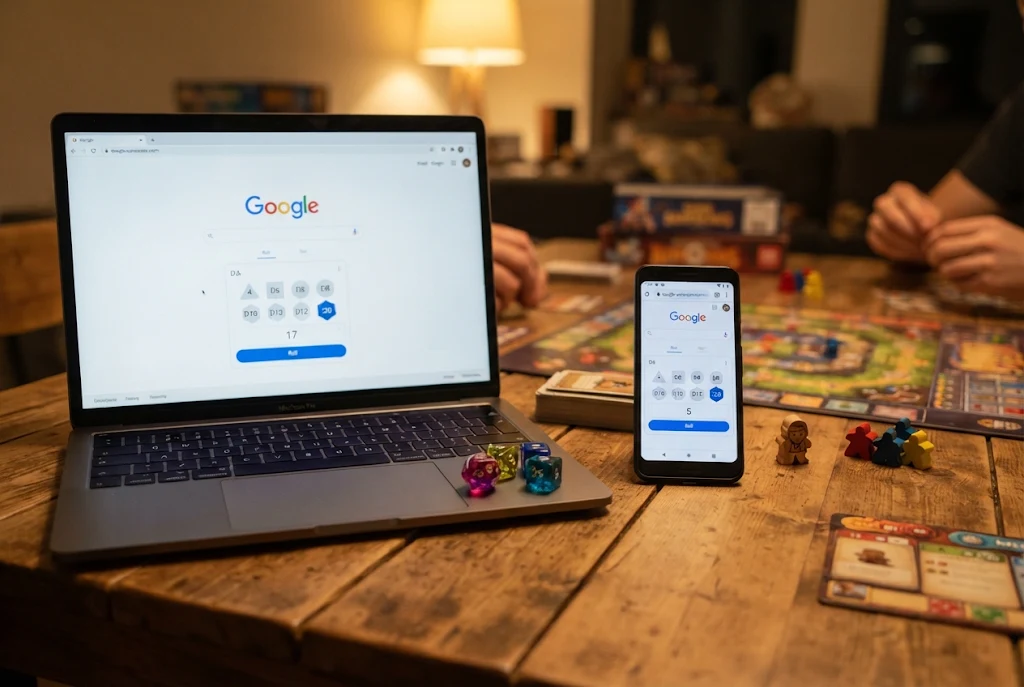
The dice for your board game went missing, and someone is already shaking an empty cup. You don’t need an app. Google Würfel, the dice roller built into Google Search, opens straight in your results and rolls one or more dice with a single tap.
The short answer: open Google and search for “Würfel werfen”, “würfeln” or “roll a die”. A dice panel appears above the normal results. Tap Roll (or Würfeln on German-language Google) to get a result. Below the die you can add 4, 6, 8, 10, 12 and 20-sided dice, roll several at once, and add a fixed number to the total.
The rest of this guide covers which search phrases work, how to set up multi-dice rolls for games like Kniffel or Dungeons & Dragons, what to do when the panel doesn’t appear, and when a real set of dice is still the better choice.
What Google Würfel Actually Is
Google Würfel isn’t a separate website or download. It’s an interactive panel inside Google Search, the same kind of tool as the built-in timer, calculator and coin flip. You search for it and use it on the results page.
At first it rolled only a single six-sided die. Since around August 2019, according to Wikipedia’s list of Google Easter eggs, it also offers four, eight, ten, twelve and twenty-sided dice, which you can roll on their own or together, with an optional modifier.
It works in any modern browser on a computer, phone or tablet, and in the Google app. You don’t need to sign in to a Google account.
Search Phrases That Open the Dice Roller
Exactly which phrase triggers the panel can depend on your language settings and on which Google domain you use (google.de or google.com). These are the most reliable phrases to try:
| What you type | Language | What usually happens |
|---|---|---|
| Würfel werfen | German | Opens the dice panel with one six-sided die |
| würfeln | German | Same panel on German-language Google |
| roll a die | English | Opens the panel on most Google versions |
| roll dice | English | Same panel, plural wording |
| roll a d20 | English | Panel with a 20-sided die (worth testing in your region) |
Tip: if a German phrase only shows ordinary search results, switch to an English phrase. Older German tech articles said the tool only worked in English. That has changed, but results can still vary from one account to another.
How to Roll Dice in Google Search, Step by Step
On a Computer
- Open google.de or google.com in Chrome, Firefox, Edge or Safari.
- Type Würfel werfen and press Enter.
- The dice panel loads at the top of the results with one six-sided die already rolled.
- Click Roll or Würfeln to roll again.
- To add more dice, click the die icons in the row below the rolling area (D4, D6, D8, D10, D12, D20).
On a Phone or Tablet
- Open the Google app or your mobile browser.
- Search for würfeln or roll dice. You can also say “roll a die” to voice search.
- Tap the roll button. The numbers appear after a short animation.
- Tap the die types underneath to add more dice to the roll.
If you play games on your phone often, you can save the results page as a bookmark or a home-screen shortcut. The dice are then two taps away instead of a search every time.
Choosing the Right Dice Type
The six dice match the standard set used in most tabletop games. Here’s what each one is typically used for:
- D4 (four sides): small damage rolls in role-playing games
- D6 (six sides): the classic die for Mensch ärgere Dich nicht, Kniffel and most family games
- D8 (eight sides): weapon damage and healing in many RPGs
- D10 (ten sides): percentages when you roll two together, and some strategy games
- D12 (twelve sides): larger damage rolls, also handy for picking a month at random
- D20 (twenty sides): the main die in Dungeons & Dragons for attacks and skill checks
To remove a die you no longer need, tap or click it in the rolling area. That’s useful when a game asks for three dice in one round and two in the next.
Rolling Several Dice and Using Modifiers
Multiple Dice at Once
You can mix dice freely. Click the D6 button four times and you’ll roll four six-sided dice together. Add a D20 and it joins the same roll. The panel shows each die’s result and the total in the corner, so you don’t have to add up the numbers yourself.
For Kniffel (the German version of Yahtzee), add five D6 dice and roll them together. One limitation matters here: you can’t hold individual dice and re-roll only the rest, as you can in the real game. If you need to keep three dice, write down their values, remove them, and roll the remaining two.
Adding or Subtracting a Number
Role-playing games often add a bonus to a roll. Use the ± button next to the die types to set a modifier. Google then includes it in the total.
RPG players will recognise this from standard dice notation such as 3d6+2: roll three six-sided dice and add 2 to the sum. A minus works the same way, so 1d20−1 means one twenty-sided die minus one. In some regions you can type notation like “roll 2d8+3” straight into the search box. If that doesn’t work for you, build the roll by hand with the buttons.
Practical Ways to Use It
Board games are the obvious use, but the dice roller is handy in other situations too:
- Family game night: a quick replacement when a die has disappeared under the sofa.
- Online tabletop sessions: everyone in a video call can roll their own dice, though nobody else can see the result on your screen.
- Teaching probability: roll a D6 30 times and tally the results. Students quickly see that short runs look uneven even with a fair die.
- Fair decisions: number the options from 1 to 6 (who does the dishes, which film to watch, which restaurant) and roll once.
- Writing and drawing prompts: link each number to a character, setting or colour and let the dice choose.
Quick Setups for Popular Games
To save time at the table, here’s how to set up the dice for games that are popular in Germany:
| Game | Dice to add | Notes |
|---|---|---|
| Mensch ärgere Dich nicht | 1 × D6 | Simplest setup, just tap roll each turn |
| Kniffel | 5 × D6 | No hold function, so remove the dice you keep by hand |
| Die Siedler von Catan | 2 × D6 | Read the total for resource production |
| Monopoly | 2 × D6 | Check both dice separately to spot doubles |
| Dungeons & Dragons attack | 1 × D20 + modifier | Set your attack bonus with the ± button |
| Percentage roll | 2 × D10 | Decide beforehand which die counts as the tens |
For games with two dice, look at each die and not just the total. Doubles in Monopoly and similar rules depend on the individual numbers, and they’re easy to miss if you only glance at the sum in the corner.
Common Mistakes to Avoid
A few small slips cause most of the confusion with Google Würfel:
- Forgetting to clear old dice. Dice from the last roll stay in the panel, so a fresh search or a quick tap on each die prevents a wrong total.
- Leaving a modifier switched on. A +3 from your D&D turn will quietly change the next player’s board game roll too.
- Refreshing the page instead of rolling. That resets your setup. Use the roll button to keep your chosen dice in place.
- Relying on it for paid draws or competitions. Use a transparent method that everyone can check (see below).
When Google Würfel Doesn’t Show Up
If you only get normal links instead of the dice panel, work through these fixes:
- Change the wording. Try “roll a die” in English if “Würfel werfen” doesn’t work, or the other way round.
- Use the main search page. Some browser address bars send searches to a different search engine. Go directly to google.de and search there.
- Check your default search engine. If your browser uses Bing, Ecosia or DuckDuckGo, Google’s panel won’t appear. Each of those has its own tools, or none.
- Turn off strict content blockers. Some ad blockers and script blockers stop interactive panels from loading. Try a private window with extensions turned off.
- Update the Google app or browser. Older versions sometimes fail to render newer search features.
If none of this works, the feature may simply look different or be unavailable in your setup. Google changes search features from time to time and doesn’t always announce it.
Is It Fair? What We Know About the Randomness
People often wonder whether Google’s dice are truly random. Google doesn’t publish how the dice roller generates its numbers, so nobody outside the company can say exactly how it works.
What we can say is that a digital die uses a random number generator, so it isn’t affected by worn edges, uneven weight or a “lucky” throwing technique the way a physical die can be. For family games and casual role-playing, that’s more than fair enough.
For anything involving money, prizes or a prize draw, don’t rely on a search-page widget. Use a documented, auditable method that every participant can check.
Google Dice vs Real Dice vs Dice Apps
| Feature | Google Würfel | Physical dice | Dedicated dice apps |
|---|---|---|---|
| Cost | Free | Small one-off cost | Free or paid |
| Setup | Just a search | Need a set nearby | Download and install |
| Dice types | Six standard types | Any you own | Often many more |
| Hold and re-roll | No | Yes | Often yes |
| Roll history | No saved history | No | Often yes |
| Works offline | No, needs internet | Yes | Usually yes |
| Shared table feel | Limited | Best | Varies |
Google’s dice roller is best for quick, simple rolls. If your group plays long campaigns and wants saved rolls, custom dice or the ability to hold dice, an app built for that job is more convenient. And for the feel of a game night at the table, nothing beats real dice clattering across the board.
The Takeaway
Google Würfel gives you a full set of standard dice in seconds: search “Würfel werfen”, pick your dice, add a modifier if your game needs one, and roll. It’s ideal for a missing die, a quick decision or a classroom experiment. Its limits are no internet, no hold-and-re-roll and no roll history. Try it once before your next game night so you know which search phrase works on your device.
Frequently Asked Questions
Is the Google dice roller free?
Yes. It’s part of Google Search, costs nothing and doesn’t require a Google account.
Can I roll more than one die at a time?
Yes. Tap the die types below the rolling area to add as many as you need. The total is calculated automatically.
Does it work without an internet connection?
No. The panel loads from Google Search, so you need to be online. If you’ll be offline, take physical dice or an offline app.
Why does “Würfel werfen” only show normal search results?
Language settings, your browser’s search engine or a content blocker can stop the panel from loading. Try “roll a die” or search directly on google.de.
Can I hold some dice and re-roll the others?
Not at the moment. Every press of the roll button re-rolls all the dice in the rolling area, so write down the dice you want to keep and remove them first.