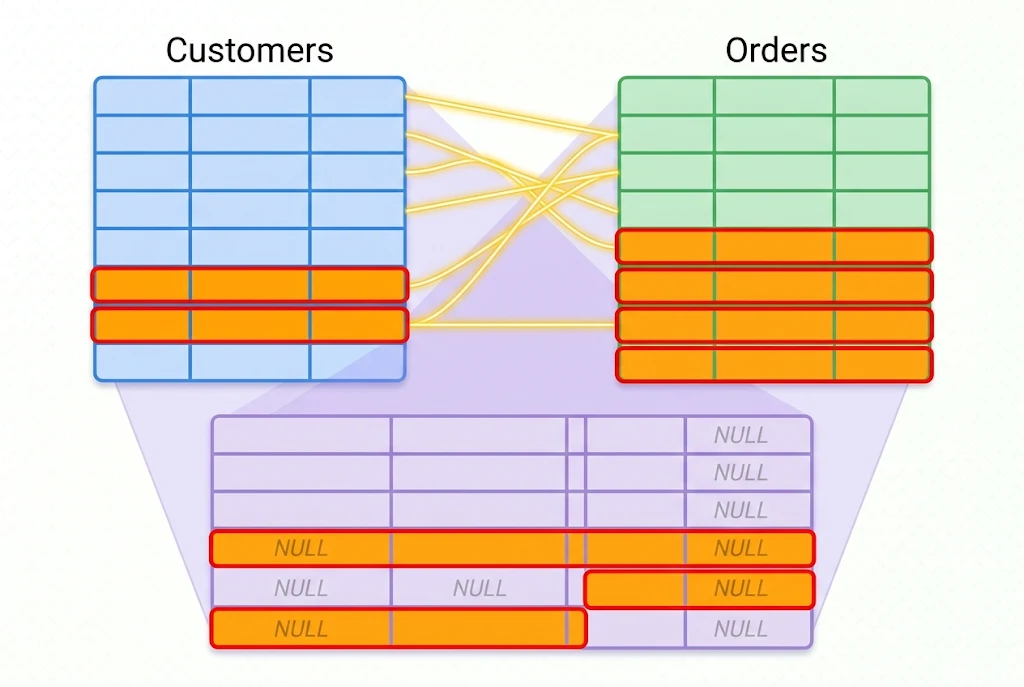
An outer join is a type of SQL join that returns matching rows from two tables plus the rows that don’t have a match on one or both sides. Where an inner join quietly drops anything without a partner, an outer join keeps those unmatched rows and fills the empty columns with NULL. That one difference is why outer joins are the right tool whenever you need to see what’s missing as well as what matches — customers with no orders, products that never sold, students not enrolled in any class.
This guide walks through the three kinds of outer joins using two tiny tables, shows the exact query and the exact result for each, and points out the mistake that trips up most beginners.
What Is an Outer Join in SQL?
A join combines rows from two tables based on a related column. An inner join returns only the rows that match in both tables. An outer join goes further: it returns the matches and preserves the leftover rows from one or both tables, using NULL to stand in for the missing values.
There are three variants:
- LEFT OUTER JOIN – keeps every row from the left table.
- RIGHT OUTER JOIN – keeps every row from the right table.
- FULL OUTER JOIN – keeps every row from both tables.
In most databases the word OUTER is optional, so LEFT JOIN and LEFT OUTER JOIN mean exactly the same thing. People tend to write the shorter version day to day.
The Two Tables We’ll Use
To keep the examples honest, here are two small tables. One holds customers, the other holds their orders.
customers
| customer_id | name |
|---|---|
| 1 | Olivia |
| 2 | Marcus |
| 3 | Priya |
| 4 | Daniel |
orders
| order_id | customer_id | amount |
|---|---|---|
| 101 | 1 | 120 |
| 102 | 1 | 75 |
| 103 | 3 | 50 |
| 104 | 5 | 200 |
Notice two things on purpose. Marcus and Daniel have no orders at all. And order 104 points to customer_id 5, which doesn’t exist in the customers table — an orphaned record you’d want to catch. Those gaps are exactly what outer joins reveal.
Left Outer Join: Keep Every Customer
A left outer join keeps every row from the table you name first (the left table) and attaches matching rows from the second table. When there’s no match, the columns from the right table come back as NULL.
sql
SELECT c.name, o.order_id, o.amount
FROM customers c
LEFT JOIN orders o
  ON c.customer_id = o.customer_id;
Result:
| name | order_id | amount |
|---|---|---|
| Olivia | 101 | 120 |
| Olivia | 102 | 75 |
| Marcus | NULL | NULL |
| Priya | 103 | 50 |
| Daniel | NULL | NULL |
Every customer shows up, even the two who never ordered. That’s the whole point of the left outer join here — it answers “who are my customers, and which of them haven’t bought anything?” in a single query. Order 104 is nowhere to be seen, because its customer isn’t in the left table.
A practical version of this: find customers with zero orders by adding WHERE o.order_id IS NULL. That one line turns the join into a “find the gaps” report.
Right Outer Join: Keep Every Order
A right outer join does the mirror image. It keeps every row from the second table and fills in NULL where the first table has no match.
sql
SELECT c.name, o.order_id, o.amount
FROM customers c
RIGHT JOIN orders o
  ON c.customer_id = o.customer_id;
Result:
| name | order_id | amount |
|---|---|---|
| Olivia | 101 | 120 |
| Olivia | 102 | 75 |
| Priya | 103 | 50 |
| NULL | 104 | 200 |
Now order 104 appears, and its customer name is NULL because no customer with id 5 exists. That’s a clean way to spot data integrity problems — orders tied to a customer record that’s missing or deleted.
In practice, right joins are less common because you can always rewrite one as a left join by swapping the table order. Many teams standardize on left joins just to keep queries readable. Both are valid; pick the one that reads clearly for the question you’re asking.
Full Outer Join: Keep Everything
A full outer join returns all rows from both tables. Matches line up, and anything without a partner on either side gets NULL in the empty columns.
sql
SELECT c.name, o.order_id, o.amount
FROM customers c
FULL OUTER JOIN orders o
  ON c.customer_id = o.customer_id;
Result:
| name | order_id | amount |
|---|---|---|
| Olivia | 101 | 120 |
| Olivia | 102 | 75 |
| Marcus | NULL | NULL |
| Priya | 103 | 50 |
| Daniel | NULL | NULL |
| NULL | 104 | 200 |
You get both kinds of gap at once: customers with no orders and orders with no customer. It’s the go-to when you’re reconciling two datasets and need to see every mismatch on both sides.
What If Your Database Doesn’t Support Full Outer Join?
Here’s a detail the basic tutorials often skip: not every database supports FULL OUTER JOIN directly. PostgreSQL, SQL Server, and Oracle do. MySQL historically does not — and that’s a common source of “syntax error” confusion. You can check the current behavior in the MySQL JOIN documentation, since database features change between versions.
The standard workaround is to combine a left join and a right join with UNION:
sql
SELECT c.name, o.order_id, o.amount
FROM customers c
LEFT JOIN orders o ON c.customer_id = o.customer_id

UNION

SELECT c.name, o.order_id, o.amount
FROM customers c
RIGHT JOIN orders o ON c.customer_id = o.customer_id;
UNION removes the duplicate matched rows automatically, so you end up with the same full result. If you need to keep duplicates for some reason, use UNION ALL and de-duplicate another way.
Why NULLs Keep Showing Up
The NULL values in these results aren’t errors. They’re the database telling you “there’s no value here because there was no match.” That has two consequences worth remembering:
NULLis not zero and not an empty string. If you need orders to show0instead ofNULLfor a report, wrap the column inCOALESCE(o.amount, 0).- You can’t test for it with
=. UseIS NULLorIS NOT NULL, never= NULL.
Handling NULL correctly is half the skill of working with outer joins.
The Mistake Almost Everyone Makes
This is the one that turns a working query into a confusing one. If you put a condition on the right table in the WHERE clause instead of the ON clause, you can accidentally cancel the outer join.
Say you want customers and their orders over $100, but you still want to see customers with no orders. This looks reasonable but doesn’t do that:
sql
-- Quietly drops customers with no orders
SELECT c.name, o.amount
FROM customers c
LEFT JOIN orders o ON c.customer_id = o.customer_id
WHERE o.amount > 100;
Because unmatched rows have o.amount = NULL, and NULL > 100 is not true, the WHERE filter removes Marcus and Daniel — effectively making it an inner join. The fix is to move the condition into the ON clause:
sql
-- Keeps every customer, filters only the orders
SELECT c.name, o.amount
FROM customers c
LEFT JOIN orders o
  ON c.customer_id = o.customer_id
  AND o.amount > 100;
Rule of thumb: conditions on the “kept” table belong in WHERE; conditions that filter the joined-in table belong in ON.
When Should You Use an Outer Join?
Reach for an outer join whenever the absence of data is part of the answer:
- Customers who haven’t placed an order yet
- Products with no sales in a date range
- Employees not assigned to any project
- Reconciling two systems to find records that exist in one but not the other
- Building reports where every category must appear, even those with no activity
If you only ever want rows that exist in both tables, an inner join is simpler and usually faster. Choose based on whether missing rows matter.
Quick Comparison
| Join type | Rows kept | NULLs appear for |
|---|---|---|
| INNER JOIN | Only matches in both tables | Never |
| LEFT JOIN | All left rows + matches | Unmatched right columns |
| RIGHT JOIN | All right rows + matches | Unmatched left columns |
| FULL OUTER | All rows from both tables | Either side, where unmatched |
Wrapping Up
The outer join family exists for one reason: to keep the rows that an inner join would throw away. Use a left join to anchor on the first table, a right join to anchor on the second, and a full outer join when both sides matter. Watch your NULL handling, and keep filter conditions in the right clause so you don’t collapse an outer join back into an inner one by accident.
The fastest way to get comfortable is to build the two little tables above in any database and run each query yourself. Seeing the NULLs land exactly where the gaps are makes the whole concept click.
FAQ
Is LEFT JOIN the same as LEFT OUTER JOIN? Yes. The OUTER keyword is optional in standard SQL, so LEFT JOIN and LEFT OUTER JOIN produce identical results. The same is true for right and full joins.
What is the difference between an inner join and an outer join? An inner join returns only rows that match in both tables. An outer join returns those matches plus the unmatched rows from one or both tables, filling the gaps with NULL.
Does MySQL support FULL OUTER JOIN? Traditionally no, which is why you’ll often see a LEFT JOIN ... UNION ... RIGHT JOIN pattern used instead. Check your version’s documentation, since database support can change.
Why do I get NULL values in my outer join results? NULL marks a row that had no match in the other table. It means “no value,” not zero. Use COALESCE to replace it with a default, and IS NULL to test for it.
Which outer join should I use? Use a left join when you want every row from the first table, a right join for every row from the second, and a full outer join when you need all rows from both.