Zecway is a workplace AI tool built on one simple idea: the answer to most questions at work already exists somewhere in your company’s files, chats and documents. It just isn’t easy to find.
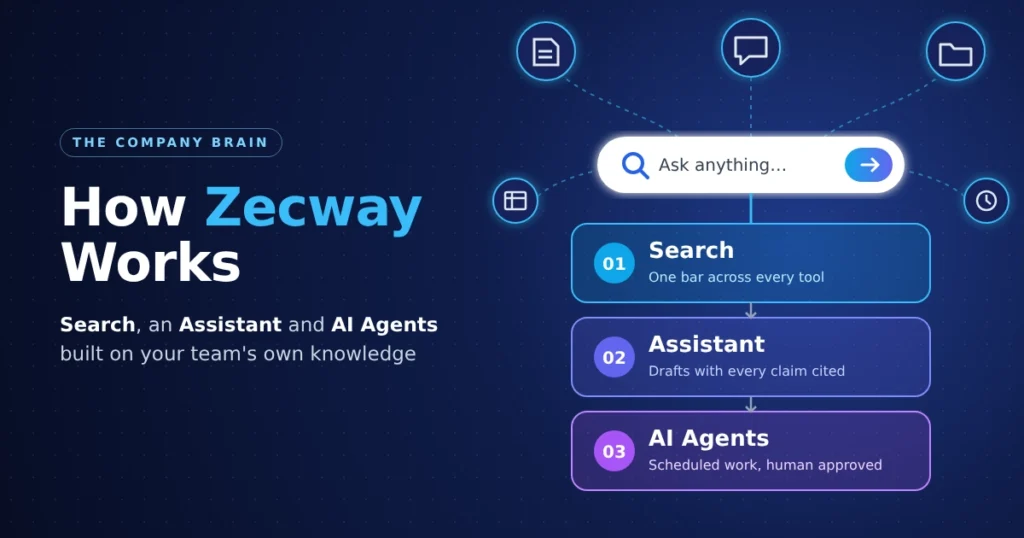
In short, Zecway works in three layers. It connects to the tools your team already uses, such as Google Drive and Slack, and makes them searchable from one bar. An assistant then uses that same company knowledge to draft replies, summaries and documents, citing each source. Finally, agents run recurring or research tasks on a schedule, with a person approving actions before anything goes out. Throughout, you only see content you already have permission to access.
The product is in limited early access in 2026, so some details below may change once it opens more widely.
The Problem Zecway Is Built to Solve
Most teams spread knowledge across many tools. Pricing decks sit in a shared drive, the reasoning behind a decision lives in a Slack thread, and the latest policy is in a doc someone renamed last month. Finding the right version often means asking a colleague, who then has to search for it too.
The official Zecway site describes this as information “scattered across ten tools.” Its pitch is a “company brain”: a single layer on top of those tools that pulls everything together and answers questions from it. If you follow business and productivity software, this fits the category of enterprise search combined with an AI assistant.
Layer 1: Search Across Every Connected Tool
Search is the starting point. The company calls it “day one,” meaning it’s the first thing a team gets after connecting its tools.
What the search does
- One search bar covers all connected apps
- Results show up as you type
- Each result comes only from content you’re allowed to see
A realistic example
The product demo shows someone typing “where is the latest pricing deck?” The answer points to the specific file (Pricing v4.2, updated Tuesday) plus the Slack thread explaining what changed. Two citations appear: one to the Drive file and one to the Slack channel.
That second link matters. Plain file search would return the deck. Pulling in the conversation around it gives the context people usually have to chase down separately.
Which tools connect?
The site names Google Drive and Slack and says the platform connects to “every tool your company uses.” It doesn’t yet publish a full integration list, so check directly before assuming a specific app, such as a CRM, ticketing system or code repository, is supported.
Layer 2: The Assistant That Turns Answers Into Work
The assistant goes beyond finding things. It writes. According to the company, it produces “drafts, summaries, and decisions grounded in your company’s real knowledge,” written in your team’s voice.
“Grounded” here means the assistant builds its response from your company’s documents instead of relying on general knowledge alone. This is broadly the approach known as retrieval-augmented generation, where a model pulls relevant source material first and then writes from it.
Example: answering an RFP security section
The demo request asks the assistant to draft the security section of a reply to a client RFP. It returns a draft built from the company’s security policy and its last SOC 2 summary, marked as “grounded in 4 company sources,” with every claim cited.
Anyone who has filled out security questionnaires will see the value. These answers are usually copied by hand from old responses and policy docs. A cited draft gives you a starting point and a way to check each line.
Why citations matter
Every answer links back to where it came from. That lets you:
- Confirm a claim before sending it to a client
- Spot outdated sources, such as an old policy version
- Open the original document for full context
A cited draft still needs review. Citations make checking faster, but they don’t replace it.
Layer 3: AI Agents That Run on Their Own
Agents are the third layer. Zecway describes them as “AI teammates that take on real work,” and you create one by describing a task in plain language. The tagline for this feature is “Describe a chore. Get a worker.”
How an agent runs
| Stage | What happens | Example from the demo |
|---|---|---|
| Trigger | A schedule or event starts the agent | Every Monday, 9am |
| Plan and execute | The agent researches and prepares output | “Researches on its own” |
| Post | Results are delivered to the team | Posted to Slack |
| Approve | A person signs off before actions go out | “You approve, it sends” |
Practical uses
No list of agent templates has been published yet, but this design suits tasks like:
- A weekly summary of what changed in key project documents
- A Monday briefing on open customer issues raised in Slack
- Background research on a topic before a meeting
If you’ve used a web-based task scheduler, the idea is similar, except the agent prepares the content rather than just reminding you about it. The human approval step is the key safeguard. The agent can draft and plan, but someone on the team decides whether anything is sent.
How Zecway Handles Permissions and Data
For most companies, security is the first question. The site even labels this section “the part enterprises ask first.”
Its approach is that permissions are “enforced in the database, before anything ever reaches an AI.” In practice, if a file is restricted to the finance team, someone in marketing won’t see it in search results or in the assistant’s answers. The site shows this as “Same question. Different clearance”: two people asking the same thing can get different answers based on their access.
The company also states “your data stays yours.” However, the public site doesn’t yet give details on certifications, data storage location or retention. If you’re evaluating it for a business, ask for security documentation and data processing terms before connecting sensitive systems.
How the Three Layers Fit Together
Each layer builds on the one before it:
- Search finds information (what is true)
- Assistant uses it to produce work (what to write or decide)
- Agents repeat that work on a schedule (what can run without you)
The company sums it up this way: “Search is day one. The assistant turns answers into work. Agents turn work into something that runs without you.”
Getting Started
Access is through a limited early access sign-up on the official site, with no credit card required. Pricing hasn’t been published. Before signing up, it helps to list:
- Which tools your team relies on most
- Whether those tools have clean, current permissions (existing access carries over, so messy permissions carry over too)
- Two or three repetitive tasks you’d want an agent to handle
Conclusion
Zecway works by connecting your company’s tools, making them searchable from one place, and then building an assistant and agents on top of that shared knowledge while respecting existing permissions. Cited answers address a real trust problem with workplace AI, and human approval keeps agents in check. Since it’s still in early access, confirm integrations, pricing and security details with the company directly before committing.
FAQ
What is Zecway used for?
It’s used to search across a company’s tools, draft cited documents and replies, and run scheduled AI agents for recurring tasks.
Does Zecway work with Slack and Google Drive?
Yes, both are named on the official site. A full list of other integrations hasn’t been published yet.
Can employees see files they shouldn’t through the tool?
According to the company, no. Permissions are enforced before content reaches the AI, so each person only sees what they already have access to.
How much does Zecway cost?
Pricing isn’t public yet. Early access is free to request and doesn’t require a credit card.